Recommended Reading

13 Minutes
Structured Logging: A Complete Guide with Examples
Fix Bugs Faster! Log Collection Made Easy
Plain-text logs are great if you want a simple explanation of how a function is performing or why a crash happened. But as your application grows, they become difficult to search and analyze. Structured logging makes production data easier to filter, correlate, and use across modern logging tools.
This guide will give you the springboard to build structured logs effectively, showing you how to:
- Write structured logs in JavaScript, Node.js, Python, Java, and .NET.
- Understand the benefits of structured logs over plain-text logging.
- View, centralize, and collect logs from servers, browsers, and mobile devices.
- Use consistent fields, levels, and schemas.
- Avoid noisy, slow, and expensive logging.
First, what is structured logging?
Structured logging is the practice of recording log entries as named fields rather than as freeform sentences, typically using JSON. Each value is stored under a key, such as timestamp, level, message, or userId , which allows logging tools to recognize them directly.
- Logging tools can index, filter, group and analyze events without first having to decipher the raw text.
- JSON is widely supported by programming languages, logging libraries, and log management platforms.
Other structured formats, such as logfmt and XML, also exist, but JSON is one of the most popular choices.
Why use structured logging?
Structured logging turns application events into searchable, machine-readable data. Instead of scanning thousands of log lines, you can filter, correlate, and analyze events using individual fields.
- Debug faster: Find errors by
userId,requestId,sessionId, or service instead of searching raw text. - Improve observability: Correlate logs with metrics and traces to understand what happened across distributed systems.
- Automate monitoring: Power dashboards, alerts, and reports without building custom parsers.
- Scale consistently: Use the same schema across services so logs remain easy to search as your application grows.
The syntax differs between languages, but the idea is always the same: log structured fields instead of embedding values into plain-text messages which are hard for machines to interpret.
Structured logging vs. unstructured logging
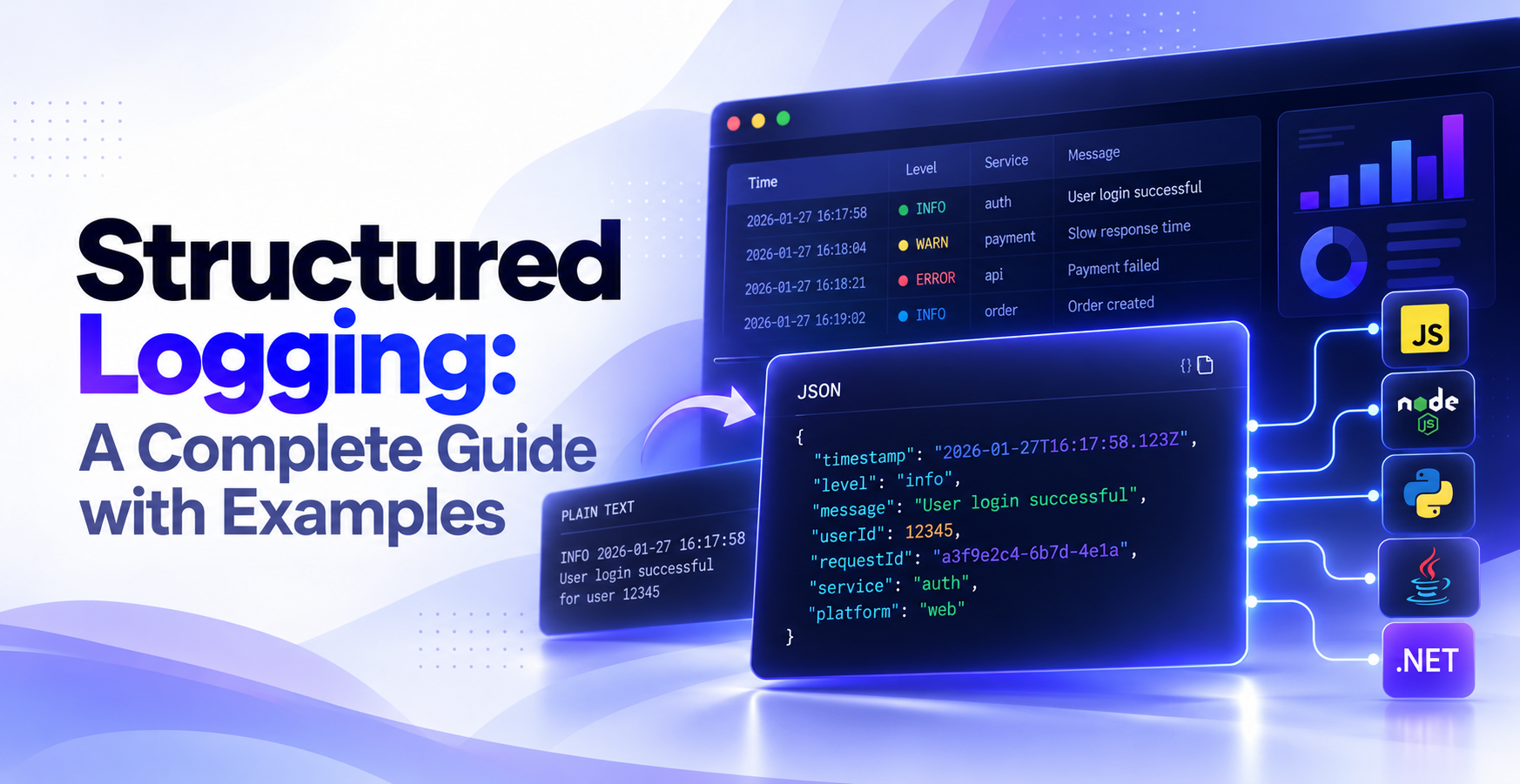
Both structured and unstructured logging formats can record the same event, but they organize the information differently. The structured version requires slightly more planning, but it is easier for machines to process.
An unstructured log stores the event as one line of text:
INFO 2026-01-27 16:17:58 User login successful for user 12345
A structured log stores the same information as separate fields:
{
  "timestamp": "2026-01-27T16:17:58.123Z",
  "level": "info",
  "message": "User login successful",
  "userId": 12345
}
| Unstructured logging | Structured logging |
|---|---|
| Plain-text messages | JSON or key-value pairs |
| Search by keywords or text matching | Search by individual fields such as userId or requestId |
| Limited filtering and grouping | Filter, sort, and group by indexed fields |
| Requires custom parsing for automation | Works directly with dashboards, alerts, and analytics |
| Events must be correlated manually | Events can be connected using request, session, or user IDs |
The structured version is much more useful for production debugging, monitoring, and analysis because the machine-queryable data is clearer and more actionable.
Structured logging examples by language
The core idea of structured logging is the same in every language: pass logs in machine-friendly fields, not a formatted string. What changes is the library and the syntax.
Here is the same login event across four common stacks, with the output each one produces.
Structured logging in JavaScript and Node.js
In Node.js, many developers choose to build structured logs with the Pino and Winston libraries, which make it easy to emit structured logs that can be correlated across services when consistent identifiers are propagated. Instead of inserting values into a sentence, you pass them as named fields alongside the log message.
import pino from "pino";

const logger = pino();

logger.info(
  { userId: 12345, service: "auth" },
  "User login successful"
);
Pino emits the event as compact JSON:
{"level":30,"time":1769533078123,"userId":12345,"service":"auth","msg":"User login successful"}
The fields can then be parsed, indexed, and searched by a log management platform. Pino uses a numeric value for level, stores the message in msg, and records time as a Unix timestamp.
For more readable output during development, install pino-pretty:
npm install --save-dev pino-pretty
Then enable it as a transport:
import pino from "pino";

const logger = pino({
  transport: {
    target: "pino-pretty"
  }
});
Some hard-won advice from our engineers: use pino-pretty locally, while keeping Pino’s standard JSON output in production.
Structured logging in Python
Python’s built-in logging module can produce structured logs, but many developers prefer structlog because it simplifies contextual logging and lets you switch between human-readable and JSON output with minimal configuration.
import structlog

structlog.configure(
    processors=[
        structlog.dev.ConsoleRenderer(),
        # Replace with JSONRenderer() in production
    ]
)

log = structlog.get_logger()

log.info(
    "User login successful",
    user_id=12345,
    service="auth"
)
During development, ConsoleRenderer() formats logs for easier reading in the terminal:
2026-01-27 16:17:58 [info     ] User login successful
user_id=12345 service=auth
Before deploying your application, replace ConsoleRenderer() with structlog.processors.JSONRenderer() to emit structured JSON:
{
  "event": "User login successful",
  "user_id": 12345,
  "service": "auth",
  "level": "info",
  "timestamp": "2026-01-27T16:17:58.123Z"
}
Unlike Pino, which emits JSON by default, structlog lets you choose the renderer, making it easy to use readable logs during development and structured JSON in production without changing your logging calls.
Structured logging in Java
In Java, structured logging is commonly implemented with SLF4J, Logback, and the Logstash Logback Encoder. SLF4J provides the logging API, while the encoder converts each event into JSON and preserves custom fields.
import org.slf4j.Logger;
import org.slf4j.LoggerFactory;
import net.logstash.logback.argument.StructuredArguments;

Logger log = LoggerFactory.getLogger(AuthService.class);

log.info(
    "User login successful",
    StructuredArguments.kv("userId", 12345),
    StructuredArguments.kv("service", "auth")
);
With the Logstash Logback Encoder enabled, the event is written as structured JSON:
{
  "@timestamp": "2026-01-27T16:17:58.123Z",
  "level": "INFO",
  "logger_name": "AuthService",
  "message": "User login successful",
  "userId": 12345,
  "service": "auth"
}
Without the JSON encoder, Logback writes the event as plain console text. The custom values may still appear in the message, but logging platforms cannot reliably index them as separate fields.
Structured logging in .NET with Serilog
In .NET, Serilog creates structured logs from named placeholders in the message template. Each placeholder becomes a separate field instead of being merged permanently into a text string.
Log.Information(
    "User login successful for {UserId} on {Service}",
    12345,
    "auth"
);
With a JSON sink configured, Serilog preserves both the original message template and the captured values:
{
  "Timestamp": "2026-01-27T16:17:58.123Z",
  "Level": "Information",
  "MessageTemplate": "User login successful for {UserId} on {Service}",
  "Properties": {
    "UserId": 12345,
    "Service": "auth"
  }
}
Because UserId and Service remain separate properties, you can filter by them or group all events that share the same message template, regardless of the specific values.
How to view and collect structured logs
When collecting and viewing structured logs, the key requirement is to make sure the logs are consistent, searchable, sufficiently informative, secure, and manageable at production scale. Remember that structured logs can be viewed directly while developing or collected in a centralized platform for production debugging.
View structured logs during development
- Run the application from your terminal or IDE.
- Open the terminal, debug console, or browser Developer Tools where the application writes its logs.
- Reproduce the action you want to inspect, such as a login, API request, or failed payment.
- Find the relevant event and expand its fields to inspect values such as
level,message,userId, orrequestId. - Enable your logger’s readable development output if compact JSON is difficult to scan.
Search structured logs in production
- Configure your application to send logs to a log management or observability platform.
- Open the platform’s log explorer or search interface.
- Filter events by fields such as
service,environment,sessionId,requestId, device, app version, or log level. - Open the matching event and review nearby logs to understand what happened before and after it.
- Save useful searches or create alerts for recurring errors and important conditions.
Collect remote logs with Bugfender
Bugfender collects structured logs, errors, and exceptions from browsers, mobile apps, and applications running on real users’ devices.
With Bugfender, you can:
- Search logs by user, session, device, application version, or custom field.
- Inspect the events that happened before an error.
- Compare problems across operating systems, devices, and app versions.
- Investigate issues that are difficult to reproduce locally.
- Access client-side logs without asking users to export files or send screenshots.
Try Bugfender free and start collecting logs from real devices.
Structured logging best practices
Good structured logging depends on a few consistent habits that keep logs useful, searchable, secure, and affordable as an application grows. The key is to keep things stable and repeatable, and include context where possible.
| Area | Best practice |
|---|---|
| Events | Log meaningful events with appropriate levels and context. |
| Consistency | Use stable field names and schemas across applications. |
| Security | Keep secrets and unnecessary personal data out of logs. |
| Volume | Avoid excessive logging and use high-cardinality fields carefully. |
Log meaningful events, not freeform sentences
Treat each log entry as an event with named fields rather than a sentence containing embedded values.
For example, instead of writing:
logger.info(`Order 8842 shipped to warehouse 3`);
record the message and context separately:
logger.info(
  { orderId: 8842, warehouseId: 3 },
  "Order shipped"
);
This makes fields such as orderId and warehouseId available for filtering, grouping, and analysis.
Focus on events you may need to investigate later, such as:
- Requests and responses.
- Authentication events.
- User actions.
- State changes.
- Warnings and failures.
Use appropriate log levels
Log levels help separate normal activity from information that requires attention.
debug: Detailed information used mainly during development or investigation.info: Normal application events worth recording.warn: Unexpected or recoverable problems.error: Failures that prevented an operation from completing.
Set a minimum level for each environment. For example, you might enable debug locally but record only info, warn, and error in production.
Add useful context to errors
An error message alone often explains what failed but not why it failed. Include enough surrounding information to reproduce or trace the problem.
try {
  await processPayment(order);
} catch (err) {
  logger.error(
    {
      orderId: order.id,
      userId: user.id,
      requestId,
      err
    },
    "Payment failed"
  );
}
Useful context may include:
- Request, session, or transaction IDs.
- User or account IDs.
- Application version.
- Service or environment.
- Relevant state or input identifiers.
- The error object and stack trace.
But remember to be selective and be sure to include only those fields that help diagnose the event. A full data dump will bury the important details and create unnecessary storage and processing costs.
Use consistent field names and schemas
The same concept should use the same field name everywhere. Mixing userId, user_id, and userid makes cross-service searches harder and weakens correlation.
Choose a naming convention and document a small core schema. A typical log may include:
{
  "timestamp": "...",
  "level": "info",
  "message": "...",
  "service": "auth",
  "environment": "production",
  "requestId": "..."
}
Individual events can add their own fields, but the shared fields should remain stable across the codebase.
Avoid logging sensitive data
Logs are often stored for long periods and accessed by multiple systems, so sensitive values should never be written casually.
Do not log:
- Passwords.
- API keys.
- Access or refresh tokens.
- Full payment-card details.
- Authentication cookies.
- Unnecessary personal information.
Redact, mask, or hash values when you need a safe identifier. Also review nested objects before logging them, because secrets often hide inside request bodies, headers, and error payloads.
Avoid excessive logging
Logging everything creates more noise than insight. It also increases ingestion, storage, and processing costs.
Avoid logging:
- Every iteration of a loop.
- Every render or low-level function call.
- Large request and response bodies by default.
- Repeated success events that are never queried.
- Debug information in production without a clear reason.
If an event will never be searched, monitored, or analyzed during a real investigation, it usually does not need to be recorded.
Use high-cardinality fields carefully
High-cardinality fields contain many unique values, such as requestId, userId, IP address, or transaction ID.
These fields are useful for tracing individual problems, but using too many of them on high-frequency events can increase indexing costs and make some queries less efficient.
Use them where they provide clear diagnostic value, especially for:
- Errors
- Transactions
- User sessions
- Cross-service requests
Avoid attaching every possible unique identifier to every routine event.
When not to use structured logging
Structured logging is the best choice for most production applications, but it is not necessary when the additional overhead and complexity provides little benefit over simple human-readable output.
Avoid or limit structured logging when:
- Writing small throwaway scripts or prototypes.
- Printing temporary debugging information during local development.
- Logging inside extremely high-frequency code paths where every microsecond matters.
- Recording large binary data or complete request and response bodies.
- Logging information that contains passwords, tokens, or other sensitive data.
Remember to prioritize events with clear diagnostic, operational, security, or audit value. Control excessive volume, but retain events required for incident investigation and applicable compliance obligations.
Structured logging tools and platforms
Structured logs need a tool that can format, collect, search, and analyze their fields, and there are plenty to choose from. The choice really depends on whether you need simple access to the logs or more complex functionality and management tools.
| Tool or platform | Best for |
|---|---|
jq | Formatting and filtering JSON logs locally. |
| Elastic Observability | Centralized log search and analysis with Elasticsearch and Kibana. |
| Grafana Loki | Log aggregation for cloud-native and Kubernetes environments. |
| Graylog | Centralized log management, dashboards, and alerts. |
| Datadog Log Management | Combining logs with metrics, infrastructure monitoring, and traces. |
| OpenTelemetry | Collecting and exporting logs through a vendor-neutral standard. |
| Bugfender | Collecting structured logs and errors from browsers, mobile apps, and real user devices. |
For a wider comparison of mobile debugging and crash-monitoring platforms, see Bugfender’s guide to the best mobile crash reporting tools. You’ll have noticed that our own product is on the list, but we’ll try and be impartial.
Key takeaways
- Structured logging stores events as named fields instead of plain text.
- JSON is the most widely used structured log format.
- Every major language provides libraries for structured logging.
- Centralized logging platforms let you search, filter, and correlate events.
- Consistent schemas and meaningful context make production debugging significantly easier.
Frequently asked questions
Can structured logging be added to an existing application?
Yes. You do not need to replace every log at once. Start with new code, errors, authentication events, and payments, where searchable context provides the most value.
Migrate older logs gradually afterward. Some log management platforms can also parse fields from existing plain-text logs while the transition is underway.
How do you correlate structured logs across services?
Add the same correlation field to every event related to a request or transaction. Common choices include requestId, traceId, sessionId, or transactionId.
When that identifier is passed between services, you can search for it in your logging platform and reconstruct the full sequence of events across the system.
What should you do with existing unstructured logs?
Keep them while you migrate, especially if they hold useful historical data. Use parsing rules or ingestion pipelines to extract fields such as timestamps, levels, and identifiers from predictable text formats.
New logs should use structured fields directly rather than relying permanently on regular expressions or custom parsing.
Do structured logs need a fixed schema?
Not every event needs exactly the same fields, but all logs should share a stable core schema. Fields such as timestamp, level, message, service, and environment should remain consistent.
Event-specific logs can then add fields such as userId, orderId, or deviceId without changing the meaning of the shared fields.
Can structured logging replace tracing and metrics?
No. Structured logs, traces, and metrics answer different questions.
- Logs record detailed individual events.
- Traces follow requests across services.
- Metrics measure aggregated behavior over time.
They work best together: metrics reveal that a problem exists, traces show where it occurred, and structured logs provide the detailed context needed to diagnose it.
Expect The Unexpected!
Debug Faster With Bugfender

Aleix Ventayol
Aleix Ventayol is CEO and co-founder of Bugfender, with 20 years' experience building apps and solutions for clients like AVG, Qustodio, Primavera Sound and Levi's. As a former CTO and full-stack developer, Aleix is passionate about building tools that solve the real problems of app development and help teams build better software.